# Dashboard
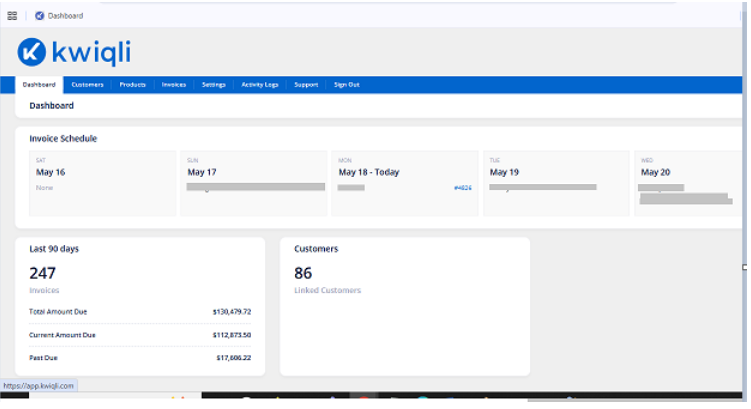
The Dashboard provides a centralized overview of billing activity, customer statistics, and upcoming invoice schedules. It serves as the main landing page for administrators after logging in to Kwiqli.
From the Dashboard, administrators can quickly monitor invoice activity, track outstanding balances, and navigate to all major modules within the platform.
---
Accessing the Dashboard
After logging in to the Kwiqli Admin Portal, the Dashboard opens automatically.
You can return to the Dashboard at any time by clicking the Dashboard tab in the top navigation menu.
---
Dashboard Navigation
The top navigation menu provides quick access to all major Kwiqli modules:
- Dashboard
- Customers
- Products
- Invoices
- Settings
- Activity Logs
- Support
- Sign Out
---
Invoice Schedule
The Invoice Schedule section displays upcoming scheduled invoice runs organized by billing date.
Each schedule card displays:
- Billing Date
- Customer Name
- Associated Invoice Number (if generated)
This section helps administrators:
- Monitor upcoming invoice generation
- Verify billing schedules
- Track recurring customer invoices
---
Last 90 Days Summary
The Last 90 Days widget provides a billing summary for recent invoice activity.
Displayed metrics may include:
### Total Invoices
Displays the total number of invoices generated during the selected time period.
### Total Amount Due
Displays the total outstanding invoice balance.
### Current Amount Due
Displays invoice balances that are currently due but not overdue.
### Past Due
Displays overdue invoice balances requiring follow-up.
This section helps administrators:
- Monitor accounts receivable
- Track billing performance
- Review overdue balances
[](https://kbase.kwiqli.com/uploads/images/gallery/2026-06/kpic1.PNG)